
Wake-on-lan allow a computer to turn on automatically over the network by sending some magic packet. See wiki.
There are some requirements in order to turn on WOL. In brief, they are
- On a wired LAN (read: ethernet card ans not those WIFI card)
- Turn on WOL feature in BIOS and windows driver
- A compatible router that can forward/send magic packet (WOL information) to network
For more details, you may want to check out on lifehacker.
I think you can find most of the general information on WOL on the internet but setting up WOL with Dlink DIR 655 isnt that straighforward.
Unlike a tomato firmware where you can login to the router admin page and click on a button to wake it up, there is no specific tool or page available in DIR655. Thus, you would need to go to some online website such as Depicius , type in the information and send the magic packet to your router ip address.
One common mistake with most users is that they thought the magic packet must be send to the target machine ip address to wake up. Unfortunately, this isnt the case with WOL. In WOL concept, a magic packet must be broadcast to a subnet by specifying an ip address ended with .255 . i.e. 192.168.0.255 or 10.0.0.255. Upon sending this packet over the network, network card which belongs to this subnet will then pick up the magic packet and retrieve the mac address from it. If the mac address belongs to itself, it will boot the machine up.
And here’s how to setup WOL in Dlink
1. Login to your router Admin Page (e.g. 192.168.0.1)
2. Go to ‘Advanced’ tab
3. Under ‘Virtual Server’, tick one of the checkbox and type in the below information
Name: <Any name>
IP Address : <your subnet ending with .255> In my case it is 192.168.0.255
Port (Public and Private) : 7
Protocol : UDP
Schedule: Always
Inbound Filter : Allow All
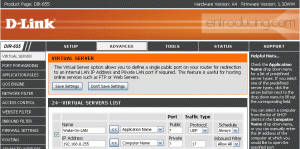
- Dlink 655 WOL setup
4. Save the setting, reboot the router, off your machine
5. Go to Depicius http://www.depicus.com/wake-on-lan/woli.aspx
6. Type in your IP address, Mac address, Subnet(i.e. 255.255.255.255) and Port number (i.e. 7) and click wake on lan button
7. Your machine should boot up!

7 comments
I have a dir-655 (firmware 1.21) and I tried your solution for WOW. I have WOL working fine, but I’m not having any luck with the Wake on WAN as described here.
any suggestions? I know I am using the the correct mac address and the correct ip adress. I am using a subnet mask of 255.255.255.255 I don’t really understand this or why the default at depicus is 255.255.255.240
thanks in advance for any ideas.
hi james, you need to broadcast to 255.255.255.255 instead of the 255.255.255.240 example in depicus.
Also, do you use a direct ip or a dynamic ip address (e.g. 123.homeip.net from dyndns.org)?
Benny,
I stubled upon you blog and tried to follow the setup WOW using WOL from depicus. It did not work because I have a different setting for my subnet mask. It is set tp 255.255.255.0 and I cannot change it to 255.255.255.255. It gives me an error. Also I have limited my IP address range to 192.168.211.130. when I set the range to 192.168.211.255 it will gives me an error message. Any help will be appricated.
Thanks
Chan
Hi Chan,
are you using dlink? I think there’s a javascript hack to allow dlink to change it to 255.255.255.255
but look here http://onlineforall.info/2010/08/how-to-wake-your-pc-on-lan/
does this also apply to Realtek?
Hello James.
I’ve been trying to get WOL working and it does work, sort of.
What I am trying to do is to wake up my machine from my iphone and it works as long as I am connected to the network over WIFI and send WOL to 255.255.255.255 or 192.168.0.255.
However, if I am connected over 3G and send a WOL packet to my internet ip on port 7 or 9 (UDP) it seems that the router wont forward the WOL packet at all to 192.168.0.255!
I’m running Wireshark and I can tell that my computer isn’t receiving any WOL packets at all if trying to send WOL packets from WAN.
I can’t really see what firmware version you have on your router, we seem to have the same hardware version though (A4). My firmware version is 1.21EU and is the latest one apparently and from the looks of it, you seem to have 1.30x. Could it be that d-link is missing WOL forwarding in the EU version?
Have you tried doing a port forward in your router i.e. port 7777 to port 7? maybe your mobile telco blocks port 7?